Planning board for your child: magnetic, DIY or digital
A visual planner for your child shows in pictures what's happening today: getting up, getting dressed, school, swimming lessons, dinner, bath, bed. For a child who can't read yet, that's something to hold on to. They don't need to ask what's coming next, they can see it for themselves, and they can also see what they need to do. That saves you a lot of repeating, and your child a lot of uncertainty. Whether you make the board with magnets, craft it yourself or set it up on a tablet depends on how old your child is and how much changes in your household.
What is a visual planner, and who does it work for?
A visual planner is a board with a timeline of the day or week, on which pictograms show what happens one after another. Most have a row for morning, afternoon and evening, or a column per day. Your child slides a pictogram aside or turns it over when something's done, and in this way sees the day getting shorter.
Children from around two to three already get something out of it, as long as you start small with three or four pictures. Toddlers like knowing what's coming after school. For children who get overstimulated quickly, or who are startled by surprises, it's often more than nice to have: a day you can see in advance feels less overwhelming. Around the age of eight, once your child reads well, they usually grow out of it and a list of words or a diary works better.
How do you make a visual planner for your child?
Start with a fixed day, such as a weekday morning, and write down what happens in which order. Then choose one pictogram per step that your child recognises. A photo of their own toothbrush works better for a toddler than a drawn icon; for an older child it matters less. Stick to one part of the day until it's running smoothly, and only then expand. For families using Chup, the morning is also the moment children tick off the most: the order is fixed and there's a clear end point, out the door.
You can make one yourself with a whiteboard or a metal board, magnetic strip and pictograms that you print and laminate. There are also complete sets for sale with hundreds of little magnets. Hang the board at your child's eye level, not yours, and in a spot they pass every morning: the hallway, the kitchen or next to the front door. Go through it together for the first few weeks, in the evening for the next day or in the morning at breakfast. That way it becomes a habit for both of you, not a board nobody looks at after a week.
You can read which tasks suit which age in our tips on dividing household chores. A four-year-old can hang up their coat and put away their plate, a seven-year-old can also lay the table and water the plants.
Which pictograms do you need?
For a child's daily schedule, you need fewer pictures than you'd think. A basic set of around fifteen covers most days: getting up, getting dressed, making the bed, having breakfast, brushing teeth, packing the school bag, school or childcare, laying the table, eating, playing, tidying up, bath or shower, pyjamas, story time, sleeping. On top of that, a few for things that recur, such as swimming lessons, sport, grandma, the childminder or the supermarket, and one for "something new", for days that go differently.
Choose one style and stick to it. A board with a mix of photos, clip art and hand-drawn pictures is hard for a young child to read. And put the word underneath each pictogram too. A child who's starting to read will recognise more and more words this way.
Magnetic, DIY or digital?
A magnetic visual planner is tangible. Your child picks up the picture themselves and turns it over, and that feels like finishing something. You notice the downside when a lot changes: someone has to set the magnets correctly for the next day every evening, the swimming lesson that gets moved too, and whoever is at grandma's doesn't see the board.
A digital visual planner has that day ready for you. In Chup, you set up tasks once, per part of the day and with a picture, and they appear automatically every day. Your child opens the kids' kiosk on a tablet or phone, sees their own day and ticks things off themselves. Appointments from the family calendar appear under "What's coming up", in the evening you see what's for dinner, and with read-aloud switched on, the kiosk reads the tasks out loud. If you want the day displayed large for the whole family, that same tablet becomes a digital visual planner for the home.
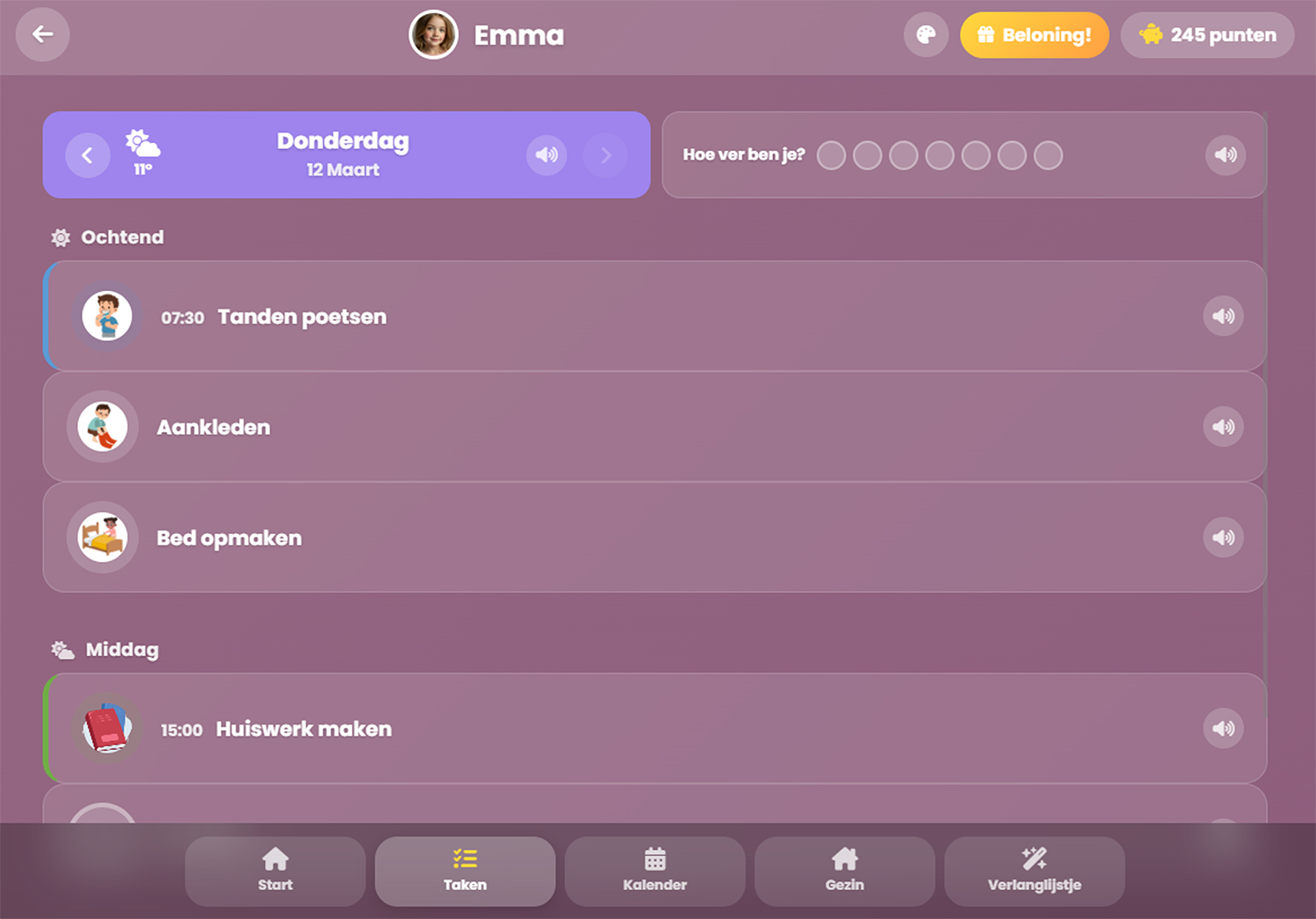
For a child of one or two, a magnetic board is often the best start. It's big, it's always on display and your child picks up the picture themselves. From around the age of three, a child can also work with a digital list, as long as each task has a picture and the list is read aloud. If you have more children, every day is different, or you want your child to also earn stars towards something fun, going digital saves you work every evening. It can also be both: a magnetic board for the very youngest, the kiosk for children from three upwards.
How do you make a good schedule for your child?
Only put on the board what your child does or needs to know themselves, not what you do all day. That doesn't always have to be a chore: some parents also add "do something kind for someone" or "be nice to your brother or sister". Keep a fixed order, so that after a few days your child knows what comes after breakfast, even without looking. Plan in free time too, as a "playing" pictogram, because that's just as much a part of the day for a child. And announce a change as soon as you know about it. A different picture on the board, looked at together the evening before, prevents a lot of tears the next morning.
Frequently asked questions
From what age is a visual planner useful? From around two to three years old, with three or four pictures for one part of the day. Toddlers can manage a whole day. Around age eight, a list of words can work, though many children still like pictures at that point.
Is a daily planner suitable for toddlers? Yes. Toddlers like knowing what's coming after school, and they can read a daily planner with pictures themselves.
Where do you hang a visual planner? At your child's eye level, in a spot they pass every day, such as the hallway or kitchen.
Can a visual planner also work on a tablet? Yes. With an app like Chup, your child sees their own day on a tablet or phone, with pictures and read-aloud, and recurring tasks are set up automatically every day.
Comments (0)